 KOF LEGEND WIKI
Reported codes to try
The table keeps spellings and reported rewards together. UCNGame and LDPlayer list these entries. Availability and rewards have not been tested on an account by this site.
| Code | Reported reward |
|---|---|
KYOPOWER777 | Recruit Coin I ×200; UG Cash ×10,000 |
KOFLPOWER | Forge Enhance Stone ×200; Training Notes ×2,000 |
KOF666 | Diamonds ×100 |
KOFLEGEND2026 | Diamonds ×200 |
KYOIORI | Arcana Coin ×1; Arcane Shard ×500 |
KOFTOP1 | Diamonds ×150 |
KOFWORLD | Training Notes ×3,000 |
KOFMVP | Recruit Coin II ×2 |
KOF777 | Arcana Coin ×2 |
KOFBEST | Curio Glue ×3,000 |
KOFVIP | Refinium ×1,000 |
KOFFUN | Recruit Coin I ×500 |
MYRTLEKOFLEGEND | Recruit Coin II ×10 |
KOFLREADYGO | Recruit Coin I ×200; Arcane Shard ×500 |
KOFLSTART2026 | Recruit Coin II ×1; UG Cash ×10,000 |
Reward reference · UCNGame ↗ (external site, opens a new tab) · LDPlayer ↗ (external site, opens a new tab)
Reach the redeem panel
- Open your player avatar at the top left.
- Choose Settings in the player menu.
- Select the Services tab and then Redeem Code.
- Paste one code into the field and press Redeem. Read the game’s response before moving to the next entry.
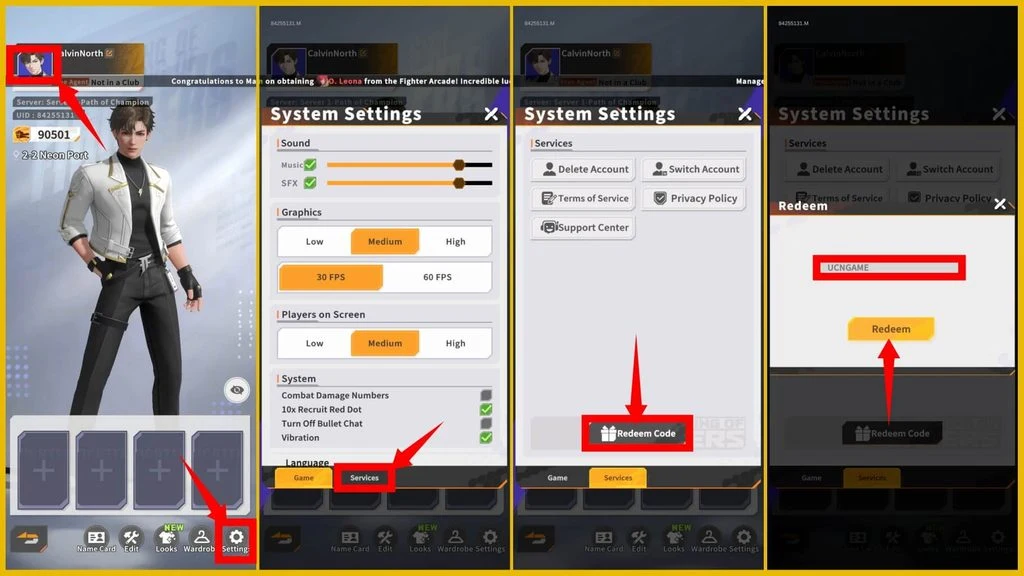
The route above follows the visible interface in UCNGame’s capture. Menu wording can vary with the app language.
Check these entries separately
Keep the full spelling when comparing a code. The extra L in KOFLREADYGO matters when you compare lists.
| Entry | What the sources disagree on | Practical next step |
|---|---|---|
| KOFNO1 / KOF888 | UCNGame and MEmu publish different shard quantities. | Read the reward popup in your account. A fixed shard total is left out here. |
| OROCHI | Some trackers list an unspecified gift, while MEmu gives quantities. | Treat the payout as unspecified until the game confirms it. |
| AREYOUREADY2026 / KAREYOUREADY2026 | Gamegoin has an additional K in its spelling. | Check the original announcement or the entry accepted by your client. |
| KOFREADYGO / KOFFIGHTER / KOFPOWER | ProGamePilot lists them as active, while Gamegoin marks them expired. | Keep their status unresolved. Check the in-game response instead of assuming a recent article date proves validity. |
These conflicts are visible in MEmu ↗ (external site, opens a new tab), Gamegoin ↗ (external site, opens a new tab) and ProGamePilot ↗ (external site, opens a new tab).
When a code is rejected
First compare the exact string with the table and remove accidental spaces. If the game says the reward was already claimed, move to another entry. For an invalid or expired message, retain the exact message and check a current publisher announcement. A tracker’s status label cannot resolve an account-specific rejection.
Use the publisher’s KOF Legend website ↗ (external site, opens a new tab) to reach its current channels. Code lists for other KOF games require separate verification.
Where is the KOF Legend code box?
The documented route is your avatar, Settings, Services, then Redeem Code. Complete the initial tutorial first if the regular menus are unavailable.
Are these KOF Legend codes guaranteed to work?
They are reported by the linked trackers and were checked against those pages on November 11, 2026. We have not redeemed them. Availability can change, and an earlier claim can prevent another redemption.